> ## Documentation Index
> Fetch the complete documentation index at: https://utoken-docs.yoostudio.ai/docs/llms.txt
> Use this file to discover all available pages before exploring further.
# WorkBuddy
> Guide to Integrating UToken with Tencent WorkBuddy
## Overview
**WorkBuddy** is Tencent's all-scenario workplace AI agent desktop workstation. Users simply describe their requirements in natural language, and WorkBuddy autonomously plans and executes tasks, delivering ready-to-use artifacts such as documents, spreadsheets, presentations, and research reports.
Unlike traditional AI chat tools, WorkBuddy goes beyond answering questions — it can:
* Autonomously decompose complex tasks
* Operate local files
* Invoke Skills
* Call MCP services
* Connect to enterprise knowledge bases and office systems
* Execute multi-step workflows and deliver results
With UToken, you can use a single unified API Key within WorkBuddy to invoke 100+ mainstream models — including Claude, GPT, Gemini, Qwen, DeepSeek, Kimi, and GLM — while benefiting from unified billing, automatic failover, and enterprise-grade reliability.
***
# Quick Integration
## 1. Navigate to Model Configuration
1. Open WorkBuddy
2. Click your avatar in the bottom-left corner
3. Go to:
```text theme={null}
Settings
└── Model Configuration
```
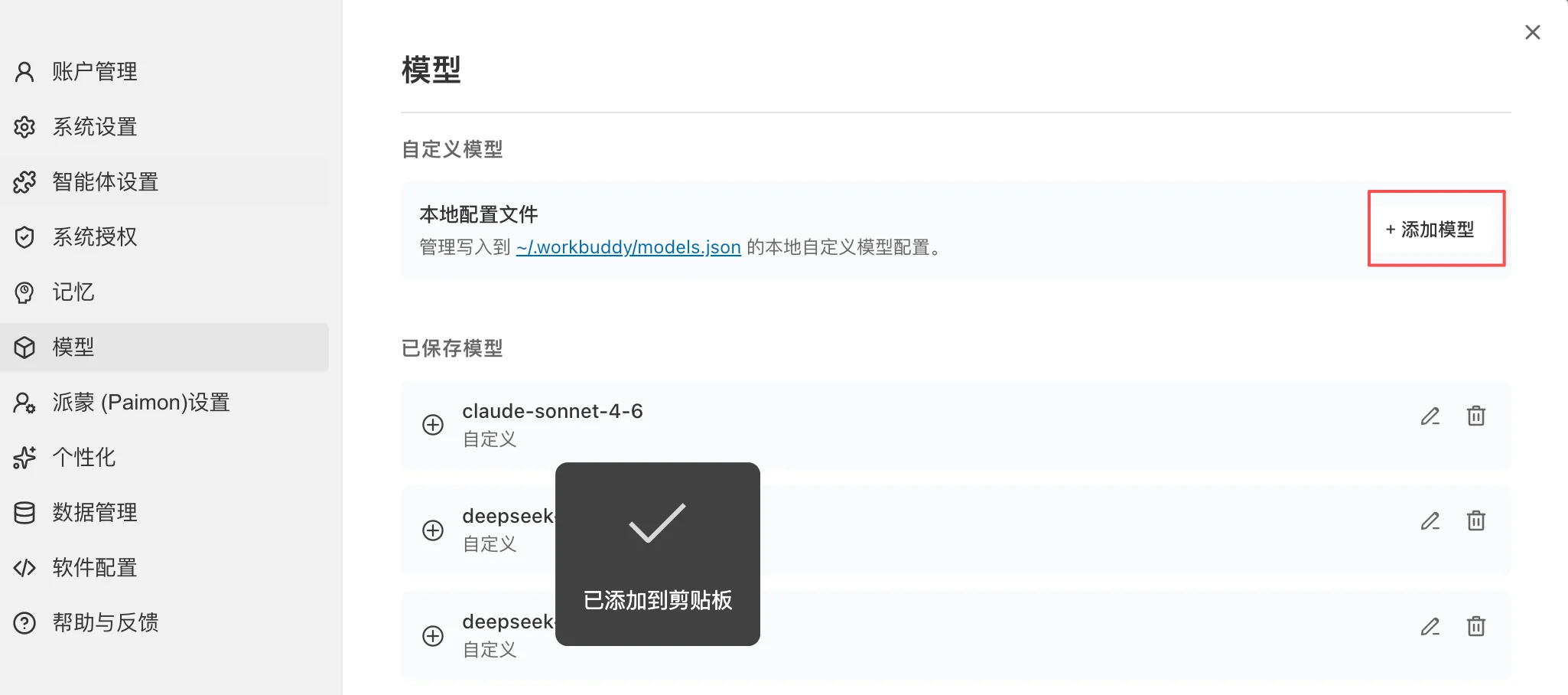 4. On the Model Management page, click:
```text theme={null}
Add Model
```
WorkBuddy supports:
* OpenAI Compatible API
* Tencent Cloud Token Plan
* Coding Plan
* Ollama (local models)
* Custom API
***
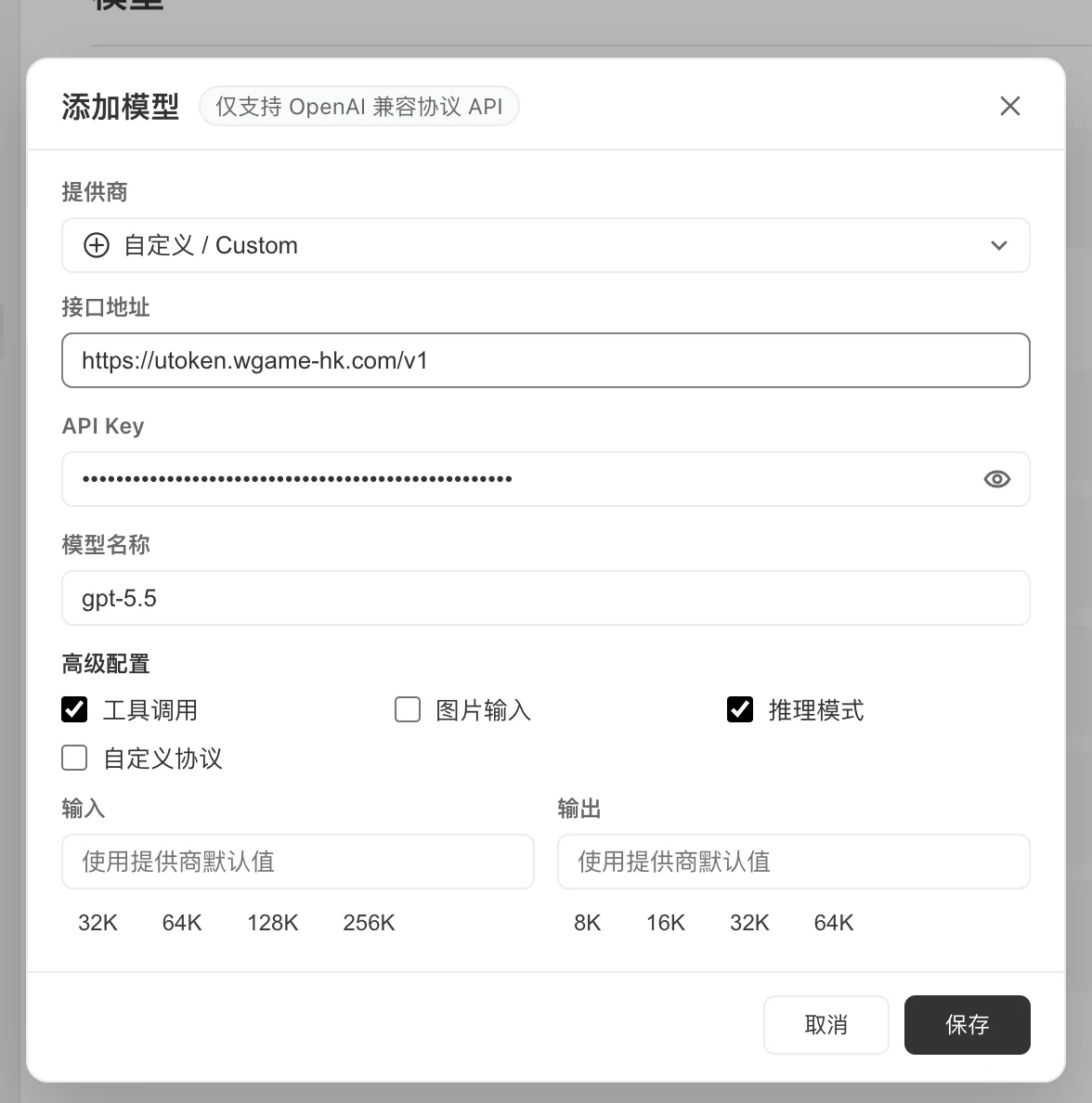
## 2. Create a Custom Model
Select:
```text theme={null}
Custom API
```
Fill in the following parameters:
| Field | Value |
| -------------- | ---------------------------------------------------------------- |
| Model Name | gpt-5.5 |
| API Key | sk-xxxxxxxx |
| Base URL | [https://utoken.yoostudio.ai/v1](https://utoken.yoostudio.ai/v1) |
| Model | gpt-5.5 |
| Tool Calling | Enabled |
| Vision Support | Enable based on model capability |
Example:
```yaml theme={null}
provider: custom
base_url: https://utoken.yoostudio.ai/v1
api_key: sk-xxxxxxxx
model: gpt-5.5
```
4. On the Model Management page, click:
```text theme={null}
Add Model
```
WorkBuddy supports:
* OpenAI Compatible API
* Tencent Cloud Token Plan
* Coding Plan
* Ollama (local models)
* Custom API
***
## 2. Create a Custom Model
Select:
```text theme={null}
Custom API
```
Fill in the following parameters:
| Field | Value |
| -------------- | ---------------------------------------------------------------- |
| Model Name | gpt-5.5 |
| API Key | sk-xxxxxxxx |
| Base URL | [https://utoken.yoostudio.ai/v1](https://utoken.yoostudio.ai/v1) |
| Model | gpt-5.5 |
| Tool Calling | Enabled |
| Vision Support | Enable based on model capability |
Example:
```yaml theme={null}
provider: custom
base_url: https://utoken.yoostudio.ai/v1
api_key: sk-xxxxxxxx
model: gpt-5.5
```
 ***
## 3. Recommended Model Configuration
| Use Case | Recommended Model |
| ------------------------ | ----------------- |
| Daily office tasks | gemini-3.5-flash |
| In-depth research | claude-opus-4-7 |
| Long-form analysis | claude-opus-4-7 |
| Data analysis | gpt-5.5 |
| Presentation generation | gpt-5.5 |
| Code development | qwen3-coder-plus |
| Multimodal understanding | gemini-3.5-flash |
| Agent tasks | claude-opus-4-7 |
***
## 4. Auto Mode
WorkBuddy provides an:
```text theme={null}
Auto
```
mode.
It is recommended to specify a model explicitly in production environments to avoid result variance caused by automatic model switching across different tasks.
***
# Core Capabilities
## 1. AI Office Assistant
Most common usage:
```text theme={null}
Generate my weekly work summary
Output requirements:
1. Work accomplishments
2. Risks and issues
3. Plan for next week
Keep within 1000 words
```
Recommended models:
```text theme={null}
gpt-5.5
claude-opus-4-7
```
***
## 2. In-Depth Research
WorkBuddy can autonomously:
```text theme={null}
Search for information
→ Read web pages
→ Organize findings
→ Output a research report
```
Example:
```text theme={null}
Research the current landscape of global AI Coding products
Focus on:
- Cursor
- Claude Code
- Gemini CLI
- OpenAI Codex
Output:
Market analysis report
```
Recommended model:
```text theme={null}
claude-opus-4-7
```
***
## 3. Data Analysis
Upload:
```text theme={null}
Excel
CSV
Database export files
```
Example:
```text theme={null}
Analyze this sales dataset
Output:
1. Monthly trends
2. Top 10 customers
3. Risk alerts
4. Charts
```
Recommended models:
```text theme={null}
gpt-5.5
gemini-3.5-flash
```
***
## 4. Automated Presentation Generation
Input:
```text theme={null}
Generate a presentation titled:
"2026 AI Industry Development Trends"
15 slides
Target audience: executive leadership
```
WorkBuddy automatically handles:
```text theme={null}
Content planning
→ Slide design
→ Chart generation
→ PPT export
```
***
## 5. Local File Processing
WorkBuddy can read from authorized directories:
```text theme={null}
Documents
Downloads
Projects
```
Example:
```text theme={null}
Organize the Downloads directory
Requirements:
- Archive images
- Archive PDFs
- Archive compressed files
- Delete duplicate files
```
***
# Skills and MCP
## 1. Skills
WorkBuddy supports capability extension via Skills.
Commonly used skills:
```text theme={null}
Web Search
Local Whisper
Office Tools
Browser Agent
Obsidian
SkillHub
```
Usage example:
```text theme={null}
Use the Web Search skill
Aggregate today's AI industry news
Generate a daily briefing
```
***
## 2. MCP Integration
Supported integrations:
```text theme={null}
GitHub
Notion
Jira
Linear
Slack
Google Drive
Enterprise internal systems
```
Example:
```text theme={null}
Fetch this week's Jira tasks
Output:
Project risk analysis
```
***
## 3. Enterprise Knowledge Base
Supported sources:
```text theme={null}
Tencent Docs
IMA Knowledge Base
Lexiang Knowledge Base
Custom MCP knowledge base
```
Example:
```text theme={null}
Answer employee questions based on company policies
```
***
# Use Case Examples
## Intelligent Operations
```yaml theme={null}
Task:
Aggregate industry news
Pipeline:
1. Search for news
2. Categorize and organize
3. Generate daily briefing
4. Output as Markdown
Model:
gemini-3.5-flash
```
***
## Market Research
```yaml theme={null}
Task:
AI Agent market research
Pipeline:
1. Search for competing products
2. Collect information
3. SWOT analysis
4. Compile report
Model:
claude-opus-4-7
```
***
## Development Assistant
```yaml theme={null}
Task:
Refactor project codebase
Capabilities:
- Code comprehension
- Bug fixing
- Unit testing
- Documentation generation
Model:
qwen3-coder-plus
```
***
# Best Practices
## 1. Use Structured Task Descriptions
Recommended format:
```text theme={null}
Objective:
Generate a market analysis report
Input:
Upload industry materials
Output:
Markdown format
Requirements:
- Data accuracy
- Minimum 5000 words
- Include charts
```
***
## 2. Model Selection Strategy
```yaml theme={null}
Fast tasks:
model: gemini-3.5-flash
Complex reasoning:
model: claude-opus-4-7
Code development:
model: qwen3-coder-plus
Data analysis:
model: gpt-5.5
```
***
## 3. Principle of Least Privilege for File Access
Recommendation:
```text theme={null}
Grant access only to necessary directories
```
Avoid granting access to the entire disk.
***
## 4. Enable Skills On-Demand
Recommendation:
```text theme={null}
Install only the Skills you need
Reduces context pollution
Improves execution efficiency
```
***
# Troubleshooting
## Invalid API Key
Check:
```text theme={null}
Whether the API Key is correct
Whether the account balance is sufficient
```
***
## Model Not Found
Check:
```text theme={null}
Whether the model name is the canonical identifier
Examples of correct values:
gpt-5.5
claude-opus-4-7
Do NOT use:
GPT 5.5
Claude Opus
```
***
## Tool Calling Failure
Check:
```text theme={null}
Whether Tool Calling is enabled
Whether the model supports Function Calling
```
***
## Slow Response
Recommendation:
```yaml theme={null}
model: gemini-3.5-flash
max_tokens: 2000
```
Also reduce the number of attachments.
***
# Security Recommendations
## API Key Management
Do NOT:
```text theme={null}
Hardcode keys in shared configuration files
```
Recommended:
```text theme={null}
Environment variables
Secret Manager
```
***
## Access Control
Recommendation:
```text theme={null}
Grant access only to working directories
Avoid access to system directories
```
***
## Enterprise Deployment
Recommended:
```text theme={null}
Centralized UToken gateway
Unified audit logging
Unified billing
Unified access control
```
***
***
## 3. Recommended Model Configuration
| Use Case | Recommended Model |
| ------------------------ | ----------------- |
| Daily office tasks | gemini-3.5-flash |
| In-depth research | claude-opus-4-7 |
| Long-form analysis | claude-opus-4-7 |
| Data analysis | gpt-5.5 |
| Presentation generation | gpt-5.5 |
| Code development | qwen3-coder-plus |
| Multimodal understanding | gemini-3.5-flash |
| Agent tasks | claude-opus-4-7 |
***
## 4. Auto Mode
WorkBuddy provides an:
```text theme={null}
Auto
```
mode.
It is recommended to specify a model explicitly in production environments to avoid result variance caused by automatic model switching across different tasks.
***
# Core Capabilities
## 1. AI Office Assistant
Most common usage:
```text theme={null}
Generate my weekly work summary
Output requirements:
1. Work accomplishments
2. Risks and issues
3. Plan for next week
Keep within 1000 words
```
Recommended models:
```text theme={null}
gpt-5.5
claude-opus-4-7
```
***
## 2. In-Depth Research
WorkBuddy can autonomously:
```text theme={null}
Search for information
→ Read web pages
→ Organize findings
→ Output a research report
```
Example:
```text theme={null}
Research the current landscape of global AI Coding products
Focus on:
- Cursor
- Claude Code
- Gemini CLI
- OpenAI Codex
Output:
Market analysis report
```
Recommended model:
```text theme={null}
claude-opus-4-7
```
***
## 3. Data Analysis
Upload:
```text theme={null}
Excel
CSV
Database export files
```
Example:
```text theme={null}
Analyze this sales dataset
Output:
1. Monthly trends
2. Top 10 customers
3. Risk alerts
4. Charts
```
Recommended models:
```text theme={null}
gpt-5.5
gemini-3.5-flash
```
***
## 4. Automated Presentation Generation
Input:
```text theme={null}
Generate a presentation titled:
"2026 AI Industry Development Trends"
15 slides
Target audience: executive leadership
```
WorkBuddy automatically handles:
```text theme={null}
Content planning
→ Slide design
→ Chart generation
→ PPT export
```
***
## 5. Local File Processing
WorkBuddy can read from authorized directories:
```text theme={null}
Documents
Downloads
Projects
```
Example:
```text theme={null}
Organize the Downloads directory
Requirements:
- Archive images
- Archive PDFs
- Archive compressed files
- Delete duplicate files
```
***
# Skills and MCP
## 1. Skills
WorkBuddy supports capability extension via Skills.
Commonly used skills:
```text theme={null}
Web Search
Local Whisper
Office Tools
Browser Agent
Obsidian
SkillHub
```
Usage example:
```text theme={null}
Use the Web Search skill
Aggregate today's AI industry news
Generate a daily briefing
```
***
## 2. MCP Integration
Supported integrations:
```text theme={null}
GitHub
Notion
Jira
Linear
Slack
Google Drive
Enterprise internal systems
```
Example:
```text theme={null}
Fetch this week's Jira tasks
Output:
Project risk analysis
```
***
## 3. Enterprise Knowledge Base
Supported sources:
```text theme={null}
Tencent Docs
IMA Knowledge Base
Lexiang Knowledge Base
Custom MCP knowledge base
```
Example:
```text theme={null}
Answer employee questions based on company policies
```
***
# Use Case Examples
## Intelligent Operations
```yaml theme={null}
Task:
Aggregate industry news
Pipeline:
1. Search for news
2. Categorize and organize
3. Generate daily briefing
4. Output as Markdown
Model:
gemini-3.5-flash
```
***
## Market Research
```yaml theme={null}
Task:
AI Agent market research
Pipeline:
1. Search for competing products
2. Collect information
3. SWOT analysis
4. Compile report
Model:
claude-opus-4-7
```
***
## Development Assistant
```yaml theme={null}
Task:
Refactor project codebase
Capabilities:
- Code comprehension
- Bug fixing
- Unit testing
- Documentation generation
Model:
qwen3-coder-plus
```
***
# Best Practices
## 1. Use Structured Task Descriptions
Recommended format:
```text theme={null}
Objective:
Generate a market analysis report
Input:
Upload industry materials
Output:
Markdown format
Requirements:
- Data accuracy
- Minimum 5000 words
- Include charts
```
***
## 2. Model Selection Strategy
```yaml theme={null}
Fast tasks:
model: gemini-3.5-flash
Complex reasoning:
model: claude-opus-4-7
Code development:
model: qwen3-coder-plus
Data analysis:
model: gpt-5.5
```
***
## 3. Principle of Least Privilege for File Access
Recommendation:
```text theme={null}
Grant access only to necessary directories
```
Avoid granting access to the entire disk.
***
## 4. Enable Skills On-Demand
Recommendation:
```text theme={null}
Install only the Skills you need
Reduces context pollution
Improves execution efficiency
```
***
# Troubleshooting
## Invalid API Key
Check:
```text theme={null}
Whether the API Key is correct
Whether the account balance is sufficient
```
***
## Model Not Found
Check:
```text theme={null}
Whether the model name is the canonical identifier
Examples of correct values:
gpt-5.5
claude-opus-4-7
Do NOT use:
GPT 5.5
Claude Opus
```
***
## Tool Calling Failure
Check:
```text theme={null}
Whether Tool Calling is enabled
Whether the model supports Function Calling
```
***
## Slow Response
Recommendation:
```yaml theme={null}
model: gemini-3.5-flash
max_tokens: 2000
```
Also reduce the number of attachments.
***
# Security Recommendations
## API Key Management
Do NOT:
```text theme={null}
Hardcode keys in shared configuration files
```
Recommended:
```text theme={null}
Environment variables
Secret Manager
```
***
## Access Control
Recommendation:
```text theme={null}
Grant access only to working directories
Avoid access to system directories
```
***
## Enterprise Deployment
Recommended:
```text theme={null}
Centralized UToken gateway
Unified audit logging
Unified billing
Unified access control
```
***